


Package Validation
When you roll back a plugin or theme, WP Rollback Pro validates the downloaded package before it replaces any files. This checks that the file is a sound ZIP and contains plugin or theme files.
Pro Feature
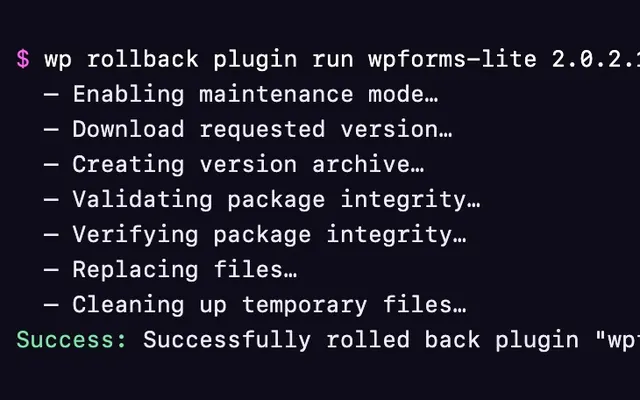
Full package validation is part of WP Rollback Pro. WP Rollback (Free) runs a basic check instead: its Validating package integrity… step only confirms that the downloaded file exists, and the Replacing files… step checks that it's a valid ZIP file before anything is replaced.
What is Package Validation?
Package validation runs automatically during every rollback in WP Rollback Pro, in the Validating package integrity… step. Think of it as a quality control inspector that examines the downloaded plugin or theme files before they're installed on your website.
Why is Validation Important?
Validation protects your website by:
- Ensuring file integrity - Confirms the downloaded ZIP file isn't corrupted
- Checking package structure - Verifies the package contains plugin or theme files
- Enforcing a size limit - Rejects packages larger than 100 MB
- Following WordPress standards - Uses WordPress Core's own file checks
How Validation Works
If any check fails, the rollback stops before any files on your site are changed.
1. WordPress Core Validation
WP Rollback Pro first runs the file checks WordPress Core provides:
- File modifications allowed - WordPress must be allowed to change files. This fails if
DISALLOW_FILE_MODSis set totrueinwp-config.php, or if a plugin blocks file changes with thefile_mod_allowedfilter. - ZIP format - The file must open as a valid ZIP archive
- File type - WordPress must recognize the file as a ZIP and allow that file type
- Upload size limit - The package can't be larger than WordPress's maximum upload size. During a rollback, WP Rollback raises that limit to at least 100 MB.
- File name - The package's file name can't contain invalid characters
2. ZIP Integrity Validation
- Rejects any package larger than 100 MB
- Opens the ZIP with a consistency check to catch corrupted files
- Requires PHP's ZIP extension (
ZipArchive)
3. Package Structure Validation
The validator checks that the package contains the kind of files a plugin or theme needs:
For Plugins:
- Must contain at least one
.phpfile
For Themes:
- Must contain at least one
.phpor.cssfile
4. File Count
The validator counts the files in the package and reports the number when validation passes.
5. Package Integrity Check (Plugin Vault Downloads)
Right after the download, before anything opens the ZIP, WP Rollback Pro runs a separate Verifying package integrity… step. For packages downloaded from Plugin Vault, it computes the file's SHA-256 checksum and compares it with the checksum the Vault sent. If they don't match, the rollback stops before any files are replaced. This step is skipped for WordPress.org downloads and Local archives.
What Files Are Allowed?
WP Rollback follows WordPress Core's approach and allows all file types in plugin and theme packages. This includes:
- PHP files (required for functionality)
- CSS and JavaScript files
- Images (JPG, PNG, SVG, etc.)
- Fonts (WOFF, TTF, etc.)
- Configuration files (JSON, XML, etc.)
- Documentation files (TXT, MD, etc.)
This permissive approach matches how WordPress Core handles plugin and theme uploads.
Validation Results
Success ✅
When validation passes, you'll see a message like:
"Package validation successful: plugin package validated with 45 files checked."
The rollback then moves on to the next step.
Failure ❌
If validation fails, the rollback stops and shows an error message explaining the issue:
- "Package file not found for validation." - The downloaded file is missing
- "WordPress Core validation failed: File modifications are not allowed on this installation." - WordPress isn't allowed to change files on your site
- "WordPress Core validation failed: Package is not a valid ZIP file format." - The download is corrupted or isn't a ZIP file
- "WordPress Core validation failed: Package is not a valid ZIP file according to WordPress." - WordPress can't confirm the file is a ZIP. This can happen when PHP's ZIP extension isn't installed.
- "WordPress Core validation failed: Package exceeds WordPress maximum upload size of 100 MB." - The package is too large
- "ZIP validation failed: ZIP functionality is not available for package validation." - PHP's ZIP extension isn't installed
- "Package structure validation failed: Package does not appear to contain valid plugin files." - The package has no plugin or theme files
- "Integrity check failed. Expected … but got …" - A Plugin Vault download doesn't match its checksum
Common Validation Issues
Corrupted Downloads
Problem: ZIP file is corrupted during download Solution: Try the rollback again - temporary network issues often resolve
File Modifications Not Allowed
Problem: WordPress isn't allowed to change files on your site Solution: Check wp-config.php for define( 'DISALLOW_FILE_MODS', true ); and check for plugins that block file changes. If you can't find the setting, ask your hosting provider.
Missing Main Files
Problem: Package has no .php file (plugins) or no .php or .css file (themes) Solution: The package may be incorrectly formatted - try a different version
Package Too Large
Problem: Package is larger than 100 MB Solution: WP Rollback Pro can't validate packages this large. Use a manual rollback instead.
Technical Details
WordPress Core Integration
WP Rollback uses WordPress's built-in validation functions:
wp_is_file_mod_allowed()- Checks that file changes are allowedwp_check_filetype_and_ext()- File type validationget_allowed_mime_types()- Checks that the ZIP file type is allowedwp_max_upload_size()- Upload size limitvalidate_file()- Path security validationwp_zip_file_is_valid()- ZIP check in the Replacing files… step, in both WP Rollback (Free) and Pro
It also uses PHP's ZipArchive to check that the ZIP is intact and to look for plugin or theme files.
No Pattern Scanning
Unlike some security plugins, WP Rollback does not scan for suspicious code patterns. This prevents false positives that could block legitimate plugins containing common functions.
Validation Philosophy
The validation follows these principles:
- Trust WordPress Core - Use the same validation as WordPress itself
- Avoid false positives - Don't block legitimate code
- Focus on structure - Ensure packages are properly formatted
- Provide transparency - Report what was validated
Getting Help
If you encounter validation errors:
- Try again - Temporary issues often resolve on retry
- Check the Troubleshooting Guide for common solutions
- Review server logs - Your hosting provider can help with permission issues
- Contact support - We're here to help with persistent problems
The validation system is designed to be reliable and permissive, allowing legitimate plugins and themes while protecting against corrupted or malformed packages.