



Developer Guide
This guide covers the hooks, REST API routes and extension points in WP Rollback 3.2 and WP Rollback Pro 2.0. Anything marked Pro exists only when WP Rollback Pro is active.
- Overview
- Hooks
- REST API
- Custom rollback steps
- JavaScript extension points
- Migrations
- Data and storage
- WP-CLI
Overview
Free and Pro
| WP Rollback | WP Rollback Pro | |
|---|---|---|
| Admin screen | Tools > WP Rollback (tools.php?page=wp-rollback) | Tools > WP Rollback Pro (tools.php?page=wp-rollback-pro) |
| Network admin screen | settings.php?page=wp-rollback | settings.php?page=wp-rollback-pro |
| Versions come from | WordPress.org | WordPress.org, local archives and the Plugin Vault |
| Boot actions | before_wpr_init, wpr_init | before_wpr_pro_init, wpr_pro_init |
| REST namespaces | wp-rollback/v1 | wp-rollback/v1 and wp-rollback-pro/v1 |
| WP-CLI | No | wp rollback plugin, wp rollback theme |
Only one of the two runs at a time. Activating Pro deactivates the free plugin.
Both plugins bundle the same shared library under the PHP namespace WpRollback\SharedCore. It provides the rollback REST routes, the rollback steps, backups and migrations, so the hooks it fires behave the same in both plugins.
While a rollback step runs, WP Rollback defines the WPR_ROLLBACK_ACTIVE constant. Check it if your code needs to behave differently during a rollback.
Linking to the rollback screen
The rollback screen is a hash route on the admin page:
/wp-admin/tools.php?page=wp-rollback#/rollback/plugin/{slug}
/wp-admin/tools.php?page=wp-rollback#/rollback/theme/{slug}
For plugins, {slug} is the plugin's folder name (or its WordPress.org slug if the folder was renamed). For themes, it's the theme's folder name. Use page=wp-rollback-pro when Pro is active. In the network admin, use /wp-admin/network/settings.php instead of /wp-admin/tools.php.
Capabilities
WP Rollback has no capability of its own and no filter to change who can roll back. It checks WordPress core capabilities:
| Action | Capability |
|---|---|
| Roll back a plugin | update_plugins |
| Roll back a theme | update_themes |
| Open the WP Rollback screen, list rollback steps, archives, migrations | update_plugins or update_themes |
| Pro: activity log, Dashboard, settings and status report routes | manage_options |
Hooks
Actions
| Action | Arguments | Fires |
|---|---|---|
wpr_plugin_rollback_successwpr_theme_rollback_success | string $assetPath, string $previousVersion, array $meta | After the replace-asset step succeeds. |
wpr_plugin_rollback_failedwpr_theme_rollback_failed | string $slug, string $targetVersion, string $message | When a rollback step fails or throws. |
wpr_archive_created | string $slug, string $version, string $type, string $zipPath | After WP Rollback writes a backup ZIP. |
wp_rollback_installed | string $version, string $pluginSlug | On the first request after a fresh install. |
wp_rollback_upgraded | string $newVersion, string $oldVersion, string $pluginSlug | On the first request after an upgrade to a higher version. |
wp_rollback_version_changed | string $newVersion, string $oldVersion, string $pluginSlug | On the first request after any version change, up or down. |
before_wpr_init | none | During plugins_loaded, before WP Rollback loads its services. |
wpr_init | PluginSetup $plugin | During plugins_loaded, after WP Rollback has loaded. |
before_wpr_pro_init | none | Pro. Same point as before_wpr_init. |
wpr_pro_init | PluginSetup $plugin | Pro. Same point as wpr_init. |
Details:
$assetPathis the plugin's main file relative to the plugins folder (for exampleakismet/akismet.php) or the theme's folder name.$previousVersionis the version that was installed before the rollback.$metais themetaobject sent with the rollback request, afterwpr_rollback_api_request_dataruns. Pro puts the rollback note in$meta['admin_note'].- The success action runs in the request that replaced the files. The
cleanupstep runs after it, in its own request. - The failed action doesn't fire when a request dies from a PHP fatal error or a timeout, because WP Rollback's error handling never runs.
wpr_archive_createdfires only for plugins and themes that aren't from WordPress.org: when WordPress updates one, and during thebackup-assetstep.$zipPathis the absolute path of the ZIP.- In the three version actions,
$pluginSlugiswp-rollbackorwp-rollback-pro. They don't fire in the activation request itself. - The boot actions fire inside
plugins_loaded, so add your callbacks when your plugin's main file loads.
Example: post failed rollbacks to Slack
// In wp-config.php: define('MY_SLACK_WEBHOOK_URL', 'https://hooks.slack.com/services/...');

$notifySlack = function (string $slug, string $version, string $message): void {
    wp_remote_post(MY_SLACK_WEBHOOK_URL, [
        'headers' => ['Content-Type' => 'application/json'],
        'body'    => wp_json_encode([
            'text' => sprintf(
                'Rollback of %s to %s failed on %s: %s',
                $slug,
                $version,
                home_url(),
                wp_strip_all_tags($message)
            ),
        ]),
        'timeout' => 5,
    ]);
};

add_action('wpr_plugin_rollback_failed', $notifySlack, 10, 3);
add_action('wpr_theme_rollback_failed', $notifySlack, 10, 3);
Example: log the versions after a plugin rollback
add_action('wpr_plugin_rollback_success', function (string $pluginFile, string $previousVersion, array $meta): void {
    if (!function_exists('get_plugin_data')) {
        require_once ABSPATH . 'wp-admin/includes/plugin.php';
    }

    $plugin = get_plugin_data(WP_PLUGIN_DIR . '/' . $pluginFile, false, false);

    error_log(sprintf('%s rolled back from %s to %s', $plugin['Name'], $previousVersion, $plugin['Version']));
}, 10, 3);
Filters
Rollbacks
| Filter | Arguments | What it changes |
|---|---|---|
wpr_rollback_api_route_args | array $args | The argument schema of the process-rollback route. Runs on rest_api_init. |
wpr_rollback_api_request_data | array $data, WP_REST_Request $request | The data each rollback step receives. Keys: assetType, assetSlug, assetVersion, meta. Anything you add to meta reaches the success action. |
wpr_premium_asset_versions | array $versions, string $slug, string $type | The versions fetch-info lists for plugins and themes that aren't on WordPress.org. Keyed by version; each entry has file, downloadUrl, released and source. Pro adds Plugin Vault versions here. Listing a version doesn't make it downloadable. |
wpr_should_delete_existing_plugin | bool $delete, string $pluginFile, string $pluginSlug | Whether replace-asset deactivates the installed plugin and moves its folder to wp-content/upgrade-temp-backup/plugins before unzipping the target version. The folder is moved back if unzipping fails, and deleted once the new version is in. Defaults to true. When false, the target version is unzipped over the live folder. |
wpr_should_show_maintenance_mode | bool $show | Whether a front-end visitor gets the 503 maintenance page during a rollback. Admin, AJAX, REST, cron and WP-CLI requests, users who can update plugins or themes, and common uptime monitors are already excluded. |
Admin screens
| Filter | Arguments | What it changes |
|---|---|---|
wpr_plugin_data | array $pluginData | Plugin header data checked before the Rollback link is added on the Plugins screen. The link needs a Version value. |
wpr_plugin_action_link | array $actions | The plugin row actions after the rollback link is added. |
wpr_plugin_markup | string $html | The HTML of the plugin Rollback link. |
wpr_theme_action_link | array $actions | The theme row actions on the network admin Themes screen (multisite only). |
wpr_theme_markup | string $html | The HTML of that theme Rollback link. |
wpr_script_allowed_pages_tools | array $screenIds | The screen IDs where the rollback app's script and styles load. |
wpr_script_allowed_pages_themesAdmin | array $screenIds | The screen IDs where the theme Rollback button script loads. It's only ever enqueued on the Themes screen, so this filter can remove it there but can't add it elsewhere. |
wp_rollback_pro_script_data | array $data | Pro. The data passed to the admin app as window.wpRollbackPro. |
wprollback_languages_directory | string $path | Free. The language folder, relative to the plugins folder. |
On multisite, plugin Rollback links only appear in the network admin.
Status reports (Pro)
| Filter | Arguments | What it changes |
|---|---|---|
wpr_report_alert_thresholds | array $thresholds | When report alerts trigger. See the keys below. |
wpr_report_log_retention_days | int $days | How long send log rows are kept. Default 90. Values below 1 fall back to 90. |
wpr_report_logo_url | string $url | The logo image in report emails. |
wpr_report_brand_homepage_url | string $url | Where the email header logo links to. |
wpr_report_docs_url | string $url | The documentation link in report emails. |
wpr_report_allow_insecure_unsub_url | bool $allow, string $url | Whether to send reports when the unsubscribe link is plain HTTP on a host that isn't a local development host. Without it, those sends are logged as failed. |
wpr_report_alert_thresholds keys:
| Key | Default | Meaning |
|---|---|---|
archive_pressure_ratio | 0.9 | Share of the archive limit an asset can use before it's flagged. |
cron_drift_multiplier | 2 | How many report intervals the next scheduled send can be overdue before WP-Cron is flagged. |
add_filter('wpr_report_alert_thresholds', function (array $thresholds): array {
    $thresholds['archive_pressure_ratio'] = 0.8;
    $thresholds['cron_drift_multiplier'] = 3;

    return $thresholds;
});
Cron events (Pro)
| Hook | Schedule | Job |
|---|---|---|
wpr_report_send | Weekly, monthly or quarterly, while status reports are on | Builds and sends the status report email. |
wpr_report_log_prune | Daily | Deletes send log rows older than the retention period. |
wpr_vault_contribute | Daily | Uploads up to three new local archives to the Plugin Vault. |
REST API
All routes live under /wp-json/.
Authentication
fetch-info, rollback-steps and process-rollback check the X-WP-Nonce header for a wp_rest nonce themselves. Call them from a logged-in admin session, for example with wp.apiFetch on an admin page, which sends the header for you. Application Passwords on their own won't pass this check. For scripted rollbacks, use the abilities or WP-CLI.
The other routes use standard WordPress REST authentication.
Routes
Namespace wp-rollback/v1:
| Method | Route | Permission | Purpose |
|---|---|---|---|
| GET | fetch-info | Nonce, plus update_plugins or update_themes for type | Details and available versions for an installed plugin or theme. |
| GET | rollback-steps | Nonce, plus update_plugins or update_themes | The ordered list of rollback steps. |
| POST | process-rollback | Nonce, plus update_plugins or update_themes for type | Runs one rollback step. |
| GET | archives | update_plugins or update_themes | Lists backup archives. |
| GET | archives/{id}/download | Logged in, update_plugins or update_themes | Downloads an archive ZIP. |
| DELETE | archives/{id} | update_plugins or update_themes | Deletes an archive file and its log entry. |
| GET | migrations | update_plugins or update_themes | Lists migrations and their status. |
| POST | migrations/{id}/run | manage_options plus update_plugins or update_themes | Runs a migration. |
| POST | migrations/{id}/revert | manage_options plus update_plugins or update_themes | Reverts a migration that supports it. |
| POST | migrations/{id}/retry | manage_options plus update_plugins or update_themes | Clears a failed migration's log and runs it again. |
| GET | activity-log | manage_options | Pro. Lists activity log entries. |
| PUT | activity-log/{id} | manage_options | Pro. Updates an entry's admin_note. |
Namespace wp-rollback-pro/v1 (Pro):
| Method | Route | Permission | Purpose |
|---|---|---|---|
| GET | dashboard/overview | manage_options | Data for the Dashboard. Cached for 5 minutes per user; pass fresh=true to skip the cache. |
| GET, PUT | settings | manage_options | Reads or updates Pro settings (archive_limit, 1 to 100). |
| DELETE | settings/cleanup-archives | manage_options | Deletes archives beyond limit (1 to 100) for each plugin and theme. |
| DELETE | settings/clear-all-archives | manage_options | Deletes every archive. |
| GET, PUT | reports/settings | manage_options | Reads or updates status report settings. |
| POST | reports/send-test | manage_options | Sends a test report to the current user. Limited to 3 per 5 minutes. |
| GET, POST | unsubscribe | Public, signed token | The unsubscribe link in report emails. |
Routes listed as PUT also accept POST and PATCH.
List parameters:
archives:page,per_page(up to 100),type(pluginortheme),orderby(name,version,user_id,created_at,file_size),order(ASCorDESC).activity-log:page,per_page(up to 100),type,action(rollback,install,update,delete,activate,deactivate,archive),context(manual,auto,cli,cron,ability),orderby(created_at,id,action,context,updated_by),order. The response hasitems,totalandpages.
The archive routes are registered by both plugins, but they read Pro's activity log. Without Pro, GET archives returns a pro_required error.
Rollback flow
The admin screen rolls back in three stages, and you can do the same:
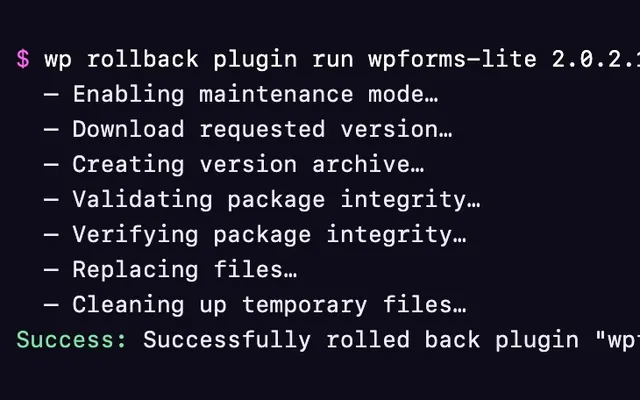
GET wp-rollback/v1/fetch-info?type=plugin&slug=akismetreturns the asset's details, withcurrentVersionand aversionsobject keyed by version number. It returns a 404 with the codeasset_not_foundif the plugin or theme isn't installed.GET wp-rollback/v1/rollback-stepsreturns the steps in order:json{ "success": true, "steps": [ { "id": "maintenance-mode", "rollbackProcessingMessage": "Enabling maintenance mode…" }, { "id": "download-asset", "rollbackProcessingMessage": "Download requested version…" } ] }POST wp-rollback/v1/process-rollbackonce for each step, in that order.
process-rollback parameters:
| Parameter | Type | Required | Notes |
|---|---|---|---|
type | string | Yes | plugin or theme. |
slug | string | Yes | Must match an installed plugin folder, the WordPress.org slug of an installed plugin, or an installed theme folder. |
version | string | Yes | The target version. |
step | string | Yes | One of the step IDs from rollback-steps. |
meta | object | No | Passed to the success action. Pro saves meta.admin_note in the activity log. |
Response:
{
  "success": true,
  "data": {
    "assetType": "plugin",
    "assetSlug": "akismet",
    "assetVersion": "5.3",
    "assetName": "",
    "meta": {}
  },
  "message": "Files replaced successfully."
}
data is null when a step throws.
Steps in each plugin:
| Step ID | Free | Pro | What it does |
|---|---|---|---|
maintenance-mode | Yes | Yes | Turns on maintenance mode if the plugin or theme is active. |
download-asset | Yes | Yes | Downloads the target version from WordPress.org. Pro uses a local archive or the Plugin Vault first. |
verify-asset | No | Yes | Checks the ZIP against the Plugin Vault's SHA-256 checksum, when there is one. |
backup-asset | Yes | Yes | Archives the installed version if it isn't from WordPress.org. |
validate-package | Basic | Yes | Free checks the ZIP exists. Pro runs full package validation. |
replace-asset | Yes | Yes | Replaces the files and reactivates the plugin or theme if it was active. The route turns off maintenance mode as soon as this step succeeds. |
cleanup | Yes | Yes | Turns off maintenance mode and deletes the temporary ZIP. Always reports success. |
Things to know:
- Each step is a separate request. Don't run them in parallel.
- A failed step returns HTTP 200 with
"success": false. The server turns off maintenance mode and fireswpr_{type}_rollback_failed. The admin screen then sends one more request withstep=cleanup, and your code should too. - Invalid parameters, including a
slugthat isn't installed or an unknownstep, return a standard WordPress REST400error.
A minimal client, run from a WP Rollback admin page where wp.apiFetch is loaded:
const rollback = async ( type, slug, version ) => {
    const body = { type, slug, version };
    const { steps } = await wp.apiFetch( { path: '/wp-rollback/v1/rollback-steps' } );

    for ( const step of steps ) {
        const result = await wp.apiFetch( {
            path: '/wp-rollback/v1/process-rollback',
            method: 'POST',
            data: { ...body, step: step.id },
        } );

        if ( ! result.success ) {
            await wp.apiFetch( {
                path: '/wp-rollback/v1/process-rollback',
                method: 'POST',
                data: { ...body, step: 'cleanup' },
            } );
            throw new Error( result.message );
        }
    }
};

rollback( 'plugin', 'akismet', '5.3' );
Custom rollback steps
A rollback is an ordered list of step classes. Each step implements WpRollback\SharedCore\Rollbacks\Contract\RollbackStep:
interface RollbackStep
{
    public static function id(): string;

    public function execute(RollbackApiRequestDTO $rollbackApiRequestDTO): RollbackStepResult;

    public static function rollbackProcessingMessage(): string;
}id()is the value sent assteptoprocess-rollback. It must be unique.rollbackProcessingMessage()is the label the progress screen shows while the step runs.execute()receives the request (getType(),getSlug(),getVersion(),getMeta()) and returns a result. UseRollbackStepResult::success($dto, $message)orRollbackStepResult::failure($dto, $message).
Each step runs in its own HTTP request, so keep state in transients or options, not in object properties. The path of the downloaded ZIP is stored in the wpr_{type}_{slug}_package transient until the cleanup step deletes it.
namespace MyPlugin;

use WpRollback\SharedCore\Rollbacks\Contract\RollbackStep;
use WpRollback\SharedCore\Rollbacks\Contract\RollbackStepResult;
use WpRollback\SharedCore\Rollbacks\DTO\RollbackApiRequestDTO;

class PurgeCacheStep implements RollbackStep
{
    public static function id(): string
    {
        return 'my-plugin-purge-cache';
    }

    public function execute(RollbackApiRequestDTO $dto): RollbackStepResult
    {
        my_plugin_purge_page_cache();

        return RollbackStepResult::success($dto, __('Page cache purged.', 'my-plugin'));
    }

    public static function rollbackProcessingMessage(): string
    {
        return __('Purging page cache…', 'my-plugin');
    }
}
Registering a step
There's no WordPress hook for registering steps. The list lives in WP Rollback's service container as a WpRollback\SharedCore\Rollbacks\Registry\RollbackStepRegisterer:
| Method | Effect |
|---|---|
registerAfter($newStep, $existingStep) | Inserts $newStep after $existingStep. Throws if $existingStep isn't registered. |
replaceStep($newStep, $existingStep) | Swaps $existingStep for $newStep. Throws if $existingStep isn't registered. |
addStep($step) | Appends a step to the end of the list, after cleanup. |
register(array $steps) | Appends several steps in order. |
The shared library's classes keep their WpRollback\SharedCore namespace in the plugin builds, so your plugin can reach the container with SharedCore::container() once WP Rollback has loaded. Do it from wpr_init (Free) or wpr_pro_init (Pro):
use WpRollback\SharedCore\Core\SharedCore;
use WpRollback\SharedCore\Rollbacks\Registry\RollbackStepRegisterer;
use WpRollback\SharedCore\Rollbacks\RollbackSteps\ReplaceAsset;

$registerStep = static function (): void {
    SharedCore::container()
        ->make(RollbackStepRegisterer::class)
        ->registerAfter(\MyPlugin\PurgeCacheStep::class, ReplaceAsset::class);
};

add_action('wpr_init', $registerStep);     // WP Rollback
add_action('wpr_pro_init', $registerStep); // WP Rollback Pro
Internal API
SharedCore::container(), the step registry and the built-in step classes are internal to WP Rollback. They have no backwards-compatibility promise and can change in any release. Test your step again when you update WP Rollback.
Things to know:
- Anchor your step to one both plugins register:
MaintenanceMode,BackupAsset,ReplaceAssetorCleanup, all inWpRollback\SharedCore\Rollbacks\RollbackSteps. Pro swapsDownloadAssetfor its Plugin Vault download step, soregisterAfter(..., DownloadAsset::class)throws there. - The container creates your step class and fills type-hinted constructor dependencies.
- A registered step shows up in
rollback-steps, on the progress screen and in Pro's WP-CLI rollbacks. - If your step fails, the rollback stops, the failed action fires and the admin screen runs
cleanup. A step placed afterreplace-assetruns after the files have already been replaced.
JavaScript extension points
The rollback screen is a React app. It runs three filters through @wordpress/hooks, loaded from WordPress as wp.hooks, so any script that depends on wp-hooks shares the same filter registry.
| Filter | Arguments | Returns |
|---|---|---|
wpRollback.templates | templates | The rollback modal's templates. |
wpRollback.rollbackRequestBody | body, context | The body sent with every process-rollback request. |
wp_rollback_is_premium_asset | isPremium, type, slug | Whether the screen treats the asset as premium. |
wpRollback.templates gets an object keyed by template name: confirm, progress, failed, changelog and complete, plus notes in Pro. Each entry has title, icon, component and buttons. A button's onClick returns the next template's name, or null to close the modal. In titles, <type/> is replaced with "Plugin" or "Theme". Free adds its templates at priority 10 and Pro at 20, so use a higher priority to see the final set. A replacement component receives only buttons and queryArgs props; the rollback state isn't available outside the app.
wpRollback.rollbackRequestBody runs once per rollback, before the first step. body holds type, slug, version and nonce. context holds rollbackInfo (the fetch-info data), rollbackVersion, type, slug and meta. The app sets step and meta after the filter runs, so you can't change those two.
wp_rollback_is_premium_asset starts from the isPro value fetch-info returned. In the free plugin, true replaces the version list with a WP Rollback Pro notice.
Loading your script
Enqueue your script on the WP Rollback screen with wp-hooks as a dependency:
add_action('admin_enqueue_scripts', function (): void {
    $screen = get_current_screen();
    $screens = ['tools_page_wp-rollback', 'tools_page_wp-rollback-pro'];

    if (!$screen || !in_array($screen->id, $screens, true)) {
        return;
    }

    wp_enqueue_script(
        'my-wpr-extension',
        plugins_url('js/my-wpr-extension.js', __FILE__),
        ['wp-hooks'],
        '1.0.0',
        true
    );
});
In the network admin, the screen IDs are settings_page_wp-rollback-network and settings_page_wp-rollback-pro-network.
Example: send extra data with a rollback
Add a field to the request body in JavaScript:
// js/my-wpr-extension.js
wp.hooks.addFilter( 'wpRollback.rollbackRequestBody', 'my-plugin/ticket', ( body ) => ( {
    ...body,
    ticket_id: window.myPlugin?.ticketId ?? '',
} ) );
Then copy it into meta on the server, so it reaches wpr_{type}_rollback_success:
add_filter('wpr_rollback_api_request_data', function (array $data, \WP_REST_Request $request): array {
    $ticket = $request->get_param('ticket_id');

    if (is_string($ticket) && $ticket !== '') {
        $meta = is_array($data['meta'] ?? null) ? $data['meta'] : [];
        $meta['ticket_id'] = sanitize_text_field($ticket);
        $data['meta'] = $meta;
    }

    return $data;
}, 20, 2);
Example: relabel the confirm button
wp.hooks.addFilter(
    'wpRollback.templates',
    'my-plugin/confirm-label',
    ( templates ) => ( {
        ...templates,
        confirm: {
            ...templates.confirm,
            buttons: {
                ...templates.confirm.buttons,
                confirm: { ...templates.confirm.buttons.confirm, title: 'Roll back now' },
            },
        },
    } ),
    30
);
Script handles and data
| Plugin | Script and style handle | Data object |
|---|---|---|
| Free | wp-rollback-tools | window.wprData |
| Pro | wp-rollback-pro-tools | window.wpRollbackPro |
Both data objects include restUrl, restApiNonce, adminUrl, pluginsUrl, themesUrl, rollbackSteps, dateFormat and timeFormat. Pro's object passes through the wp_rollback_pro_script_data filter first.
Migrations
WP Rollback runs its database and storage changes through a small migration framework, and add-ons can use it too. Every migration appears on the Migrations screen at #/migrations on the WP Rollback admin page (for example tools.php?page=wp-rollback-pro#/migrations), where you can run, revert or retry it.
A migration implements WpRollback\SharedCore\Migrations\MigrationInterface. Extending WpRollback\SharedCore\Migrations\AbstractMigration means you only set properties and write run():
use WpRollback\SharedCore\Migrations\AbstractMigration;

class MyAddonCreateTable extends AbstractMigration
{
    public function __construct()
    {
        $this->id          = 'my_addon_create_table';
        $this->timestamp   = 1790000000; // 2026-09-21 14:13:20 UTC
        $this->label       = 'Create the My Add-on table';
        $this->description = 'Creates the table My Add-on uses to store rollback notes.';
        $this->canRevert   = false;
    }

    public function run(): bool
    {
        // dbDelta(), update_option(), and so on.
        // Return true on success. Returning false or throwing marks it failed.
        return true;
    }
}
Register it on the container's MigrationManager from the boot actions:
use WpRollback\SharedCore\Core\SharedCore;
use WpRollback\SharedCore\Migrations\MigrationManager;

$registerMigration = static function (): void {
    SharedCore::container()
        ->make(MigrationManager::class)
        ->registerMigration(MyAddonCreateTable::class);
};

add_action('wpr_init', $registerMigration);
add_action('wpr_pro_init', $registerMigration);
How it runs:
- Pending migrations run on
admin_initand when WP Rollback is upgraded, intimestamporder. - A migration that succeeded doesn't run again. One that failed is skipped until someone retries it from the Migrations screen or
POST migrations/{id}/retry. One that was reverted stays reverted until someone runs it again (Run, orPOST migrations/{id}/run). - Status, attempts and the last error are stored in the
wp_rollback_migrations_logoption. - Migration IDs share one log with WP Rollback's own migrations, so prefix yours with your plugin's name.
AbstractMigrationsetscanReverttotrueand itsrevert()returnsfalse. SetcanReverttofalse, or implementrevert().
The same internal API warning as custom rollback steps applies.
Data and storage
Backups
- Backups live in a folder inside uploads named
wp-rollback-{hash}. The random hash is stored in thewp_rollback_dir_hashoption. Older versions useduploads/wp-rollback/, and a migration moves those files. - Files are named
{slug}-{version}.zip. The folder getsindex.php,index.htmland a.htaccessthat denies direct access. - WP Rollback archives plugins and themes that aren't from WordPress.org, before WordPress updates them and during the
backup-assetstep. - The free plugin keeps 5 archives per plugin or theme. Pro keeps
archive_limitfrom thewpr_settingsoption (25 by default, up to 100). - Uninstalling either plugin leaves the backup folder in place.
Options
| Option | Contents |
|---|---|
wp_rollback_dir_hash | The random part of the backup folder name. |
wp_rollback_migrations_log | Migration status. |
wp-rollback_current_version, wp-rollback_previous_version | The free plugin's current and previous version. |
wp-rollback-pro_current_version, wp-rollback-pro_previous_version | Pro. The same for Pro. |
wpr_settings | Pro. archive_limit and the status report settings under reports. |
Tables
WP Rollback Pro's migrations create and update these tables. The free plugin doesn't create them.
| Table | Contents |
|---|---|
{prefix}rollback_activity_log | One row per logged event: type, name, slug, version_from, version_to, updated_by, status, action, context and created_at. action and context use the values listed for the activity-log route. |
{prefix}rollback_activity_meta | Extra data for a log row, keyed by rollback_id, such as admin_note and archive_file_path. |
{prefix}rollback_report_log | One row per status report email: recipient, report period, status and error message. |
When you uninstall one plugin while the other is still installed, the tables and the shared options stay.
During a rollback
- Maintenance mode writes a
.wpr-maintenancefile to the WordPress root. It expires after 10 minutes. Ifwp-content/maintenance.phpexists, it's used as the maintenance page. - The downloaded ZIP's path is kept in the
wpr_{type}_{slug}_packagetransient for up to an hour, andcleanupdeletes it. - When WP Rollback Pro restores a local backup, the download step copies it once to
{slug}-{version}-temp.zipin the backup folder and points the transient at the copy, so the backup itself is never touched.cleanupdeletes the copy, and copies left by a rollback that stopped more than a day ago are removed the next time a backup is staged.
WP-CLI
WP Rollback Pro adds wp rollback plugin and wp rollback theme commands for listing versions and running rollbacks from the terminal. See WP-CLI for the commands.
WP-CLI rollbacks run the same registered steps as the admin screen, including custom steps. They fire wpr_{type}_rollback_success when the rollback finishes and wpr_{type}_rollback_failed when a step fails, and like the admin screen they run cleanup after a failure.
Abilities API
On WordPress 6.9 and later, WP Rollback Pro registers five abilities in the wp-rollback category, so AI agents, MCP clients and other tools can find and use them. They run as the current user and check the same capabilities as the admin screens.
| Ability | Input | What it does | Needs | REST method |
|---|---|---|---|---|
wp-rollback/get-versions | type, slug | Lists the versions an installed plugin or theme can be rolled back to, newest first, with each version's source (wordpress.org, local or vault) and which one is installed. | update_plugins for plugins, update_themes for themes | GET |
wp-rollback/rollback | type, slug, version, optional note | Replaces a plugin or theme with a version, running every rollback step. The note is saved with the rollback in the Activity Log. Marked destructive. | update_plugins for plugins, update_themes for themes | POST |
wp-rollback/get-history | optional type, per_page, page | Returns recent rollbacks from the Activity Log, newest first. | manage_options | GET |
wp-rollback/list-archives | optional type, per_page, page | Lists the backup archives made before rolling back premium plugins and themes, newest first, with each one's id, version, size and whether its file still exists. | update_plugins or update_themes | GET |
wp-rollback/delete-archive | id | Deletes a backup archive's file and its row, the same way as the Archives screen. Rollback history is kept. Marked destructive. | update_plugins or update_themes | DELETE |
type is plugin or theme. Over the REST API, which uses standard WordPress authentication such as Application Passwords:
# List the versions of a plugin
GET /wp-json/wp-abilities/v1/abilities/wp-rollback/get-versions/run?input[type]=plugin&input[slug]=woocommerce

# Roll it back, with a note for the Activity Log
POST /wp-json/wp-abilities/v1/abilities/wp-rollback/rollback/run
{"input": {"type": "plugin", "slug": "woocommerce", "version": "8.4.0", "note": "Checkout broke after the 8.5 update"}}

# Delete a backup archive
DELETE /wp-json/wp-abilities/v1/abilities/wp-rollback/delete-archive/run?input[id]=12
In PHP:
$result = wp_get_ability( 'wp-rollback/rollback' )->execute(
    array( 'type' => 'plugin', 'slug' => 'woocommerce', 'version' => '8.4.0' )
);

if ( is_wp_error( $result ) ) {
    error_log( $result->get_error_message() );
}
A rollback through an ability runs the same steps and fires the same actions as WP-CLI, including cleanup after a failure. It runs in a single request, like a plugin update from the Plugins screen.
Rollbacks made through an ability, and the archives they create, are logged with the ability context, so you can filter the Activity Log for them. A failed rollback's note is its error message.
WordPress core already has endpoints for listing installed plugins and themes, so WP Rollback doesn't register abilities for that.