


Status Report Emails
WP Rollback Pro can send recurring HTML status report emails to administrators (and any external addresses you add) so everyone knows exactly how the plugin is protecting your site — rollbacks performed, archives stored, premium plugins covered, and any operational issues that need attention.
Status reports are enabled by default on activation. The first email goes out one full period later (e.g. a month after activation on the default Monthly cadence). You can disable them, change the cadence, manage recipients, or send a test report from Tools → WP Rollback Pro → Settings → Email Reports.
Email reports are not yet available on multisite installs. On a multisite network, the Email Reports tab shows that message instead of its settings.
What's in a report
Every report opens with a hero section that adapts to your site's state. The headline leads with the protection already in place, not with a rollback count:
- Welcome — the first report the site sends, including a test report. A quick orientation plus a snapshot of what's already protected.
- All quiet — no rollbacks were needed during the period. The report confirms your backups and premium plugin coverage are ready.
- Active — rollbacks happened during the period. The supporting line under the headline says how many.
The hero also shows how many local backups are stored and how many premium plugins and themes the Plugin Vault covers, when those numbers are above zero.
After the hero, sections appear in this order:
- Alerts — your license has expired or is no longer active, an asset is near its archive limit (90% of the per-asset archive limit), rollbacks failed, or WP-Cron looks like it's lagging. The alerts section is omitted entirely when nothing needs your attention, so it only ever appears when it matters.
- Local archives — total backups currently stored, the per-asset archive limit, disk usage, and the date of the oldest archive on disk.
- Plugin Vault protection — how many premium plugins and themes on this site are rollback-able via the shared Plugin Vault, or a note that the Vault isn't connected. This section is left out when the site has no premium plugins or themes and the Vault isn't connected.
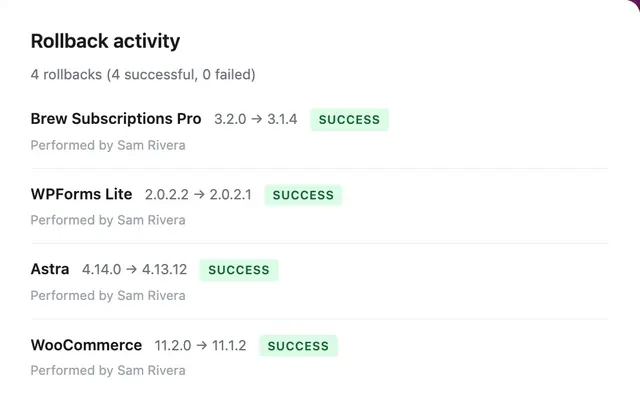
- Rollback activity — count, success/failure breakdown, and up to 10 recent rollbacks with from→to versions and the user who performed each.
- Tip — a short rotating tip that highlights a feature or a best practice.
Email layout & links
Every report has the same header and footer:
- Header logo — links to the WP Rollback website.
- Open WP Rollback Dashboard — a button that opens Tools → WP Rollback Pro on your site.
- Learn more about status reports — a footer link to this page.
- Unsubscribe — a footer link that opens a confirmation page first, so email clients that prefetch links don't unsubscribe recipients by accident. Mail apps with one-click unsubscribe (like Gmail) unsubscribe right away. See Unsubscribing.
Developers can change the logo and the documentation link. See Developer hooks.
Configuring reports
The Email Reports tab in WP Rollback Pro settings has:
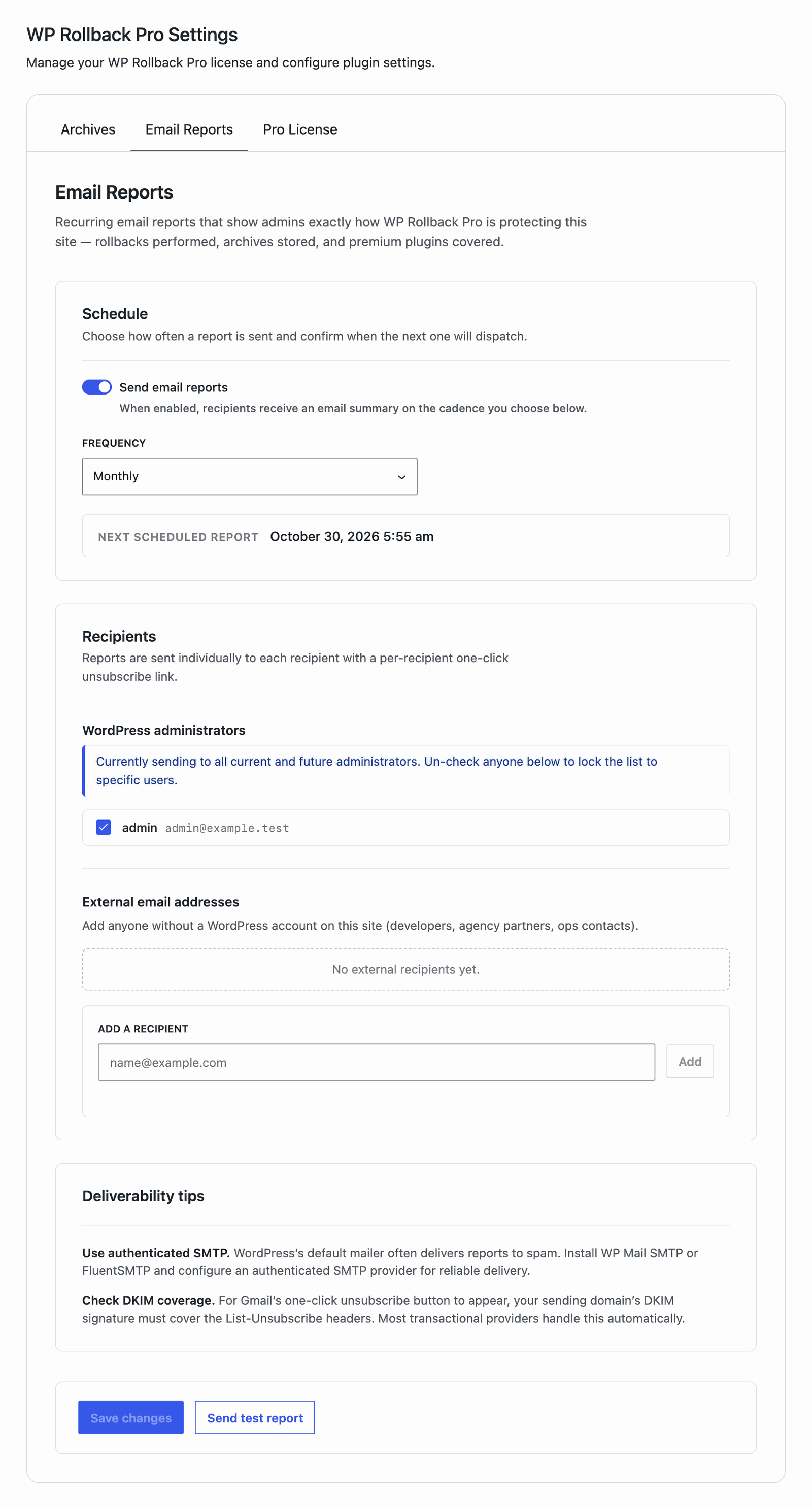
- Send email reports — turns the feature on or off.
- Frequency — Weekly, Monthly (default), or Quarterly.
- WordPress administrators — by default reports go to every administrator on the site (including new ones added later). The moment you un-check anyone, the list "freezes" to the explicit set of users you select. New administrators added after that won't automatically receive reports unless added here.
- External email addresses — any address that doesn't have a WordPress account on this site (developers, agency partners, ops contacts).
- Send test report — sends a test report to the email address on your own user profile. Limited to 3 sends per 5 minutes per user. The button is disabled while Send email reports is off, when the site isn't served over HTTPS (local development hostnames such as
localhost,.local, and.testare exempt), or when the site's admin email is missing or invalid.
Each report goes to at most 50 recipients, administrators first and then external addresses. Anyone past 50 is skipped at send time.
The tab also shows these notices when they apply:
- The site isn't served over HTTPS. The unsubscribe link must be HTTPS-only per RFC 8058, so status report emails fail to send until the site uses HTTPS.
- The site is a local development site served over HTTP. Reports still send so you can test them. Production sites need HTTPS.
- The site's admin email address is missing or invalid. Set a valid address in Settings → General.
- The list has more than 25 recipients. This is a warning only. Sending to many recipients can slow down the cron run.
- A stored recipient no longer matches an active administrator. Use the Remove user link to drop it.
- The external recipient list hasn't changed in over 90 days. The tab asks you to confirm everyone on it should still receive reports.
A Deliverability tips section is always shown:
- Use authenticated SMTP. WordPress's default mailer often delivers status reports to spam. We recommend installing WP Mail SMTP or FluentSMTP and configuring an authenticated SMTP provider.
- Check DKIM coverage. For Gmail's one-click unsubscribe button to appear, your sending domain's DKIM signature must cover the
List-UnsubscribeandList-Unsubscribe-Postheaders per RFC 8058.
Unsubscribing
Each report email includes:
- A native one-click unsubscribe button in Gmail, Outlook, Apple Mail and other modern clients (when DKIM is properly configured — see above).
- A visible "Unsubscribe" link in the footer that opens a confirmation page. The confirmation step is intentional — it defeats automatic email-client link prefetch (which can otherwise mass-unsubscribe people without their intent).
Any administrator can re-subscribe an address from the Email Reports tab. Open the Previously unsubscribed panel, click Re-subscribe next to the address, then click Save changes. When an external recipient unsubscribes, their address is also removed from the external list. To send to them again, add the address back under External email addresses.
If you're using the WordPress Privacy tools (Tools → Erase Personal Data), the eraser removes the email from the recipient list, adds it to the unsubscribe-excluded list, and deletes any associated send log rows.
Email deliverability
WP Rollback Pro produces standards-compliant headers — but actual deliverability depends on your sending mail transport.
Fromis set toSite Name <admin_email>. If your site'sadmin_emailis missing or invalid, the runner refuses to send and the Email Reports tab shows an error.Reply-Tomatches theadmin_emailso recipients can ask the WordPress admin a question by replying.Subjectis[Site Name] WP Rollback report — {period}so it shows up in the inbox with clear branding.- Unsubscribe headers —
List-Unsubscribe: <https://...>andList-Unsubscribe-Post: List-Unsubscribe=One-Clickare emitted on every send. These headers must be DKIM-signed by your MTA for Gmail and Outlook to surface the inbox-level one-click button.
For best results, install WP Mail SMTP, FluentSMTP, or another SMTP plugin and configure an authenticated transactional provider (Postmark, Mailgun, Amazon SES, SendGrid, etc.). Make sure your sending domain has SPF, DKIM, and DMARC records configured.
Privacy & retention
Recipient email addresses are personal data, so WP Rollback Pro practices data minimization:
- Each delivery attempt records one row in the
rollback_report_logdatabase table containing the recipient email, period start/end, status, and any error message. - A daily cron deletes rows older than 90 days. Developers can change this with the
wpr_report_log_retention_daysfilter. - The plugin registers suggested Privacy Policy text with WordPress (see Settings → Privacy → Policy Guide).
- The plugin registers a personal data exporter and eraser so the standard WordPress Privacy tools include status-report data when an admin processes a data export or erasure request.
Unsubscribe tokens are short signed strings (HMAC-SHA256, keyed by your site's AUTH salt) that expire after one year. They contain only the recipient email and a timestamp — no other personal information.
Developer hooks
Agencies can point the report's logo and links at their own site, and change when alerts show up. The developer guide lists every status report filter, including all the alert threshold keys.
Documentation link
Point the Learn more about status reports link at your own help page:
add_filter('wpr_report_docs_url', function (string $url): string {
    return 'https://myagency.com/docs/maintenance-reports';
});
Header logo
Change the logo image and where it links to. Gmail and Outlook don't show SVG images, so use a PNG:
add_filter('wpr_report_logo_url', function (string $logoUrl): string {
    return 'https://myagency.com/assets/email-logo.png';
});

add_filter('wpr_report_brand_homepage_url', function (string $homeUrl): string {
    return 'https://myagency.com/services/wordpress-care';
});
Alert thresholds
Flag an asset when it reaches 80% of its archive limit instead of 90%:
add_filter('wpr_report_alert_thresholds', function (array $thresholds): array {
    $thresholds['archive_pressure_ratio'] = 0.8;

    return $thresholds;
});
Sending from an HTTP staging site
Reports need an HTTPS unsubscribe link, so they fail on a plain HTTP site that isn't a local development host. To send them anyway, for example from a staging site:
add_filter('wpr_report_allow_insecure_unsub_url', '__return_true');Troubleshooting
Status reports never arrive
- Confirm the feature is enabled and your
frequencyis set to a value you actually want. - Send a test report from the Email Reports tab. If even the test fails, your site's mail transport is the problem — install WP Mail SMTP or FluentSMTP and configure an authenticated SMTP provider.
- On low-traffic sites, WordPress's built-in cron lags because it depends on page visits. Set
DISABLE_WP_CRONtotrueinwp-config.phpand add a real OS cron entry hittingwp-cron.php. - Inspect the
rollback_report_logtable directly (with your site's$wpdbprefix, typicallywp_rollback_report_log). Failed sends are recorded with the underlying error message.
Gmail doesn't show the one-click Unsubscribe button
This means your sending mail transport is not DKIM-signing the List-Unsubscribe and List-Unsubscribe-Post headers. The plugin emits the headers correctly; the MTA must include them in the DKIM h= tag for Gmail to honor them. Most reputable transactional providers (Postmark, Mailgun, Amazon SES, SendGrid) handle this automatically.
The visible Unsubscribe link in the email footer always works regardless of DKIM coverage.
Stale recipients
External email addresses on the recipient list don't have a WordPress account, so they keep receiving reports until you remove them. The Email Reports tab nudges you every 90 days to review the external list — useful when contractors leave or partnerships change.